Problem
Every company that handles customer voice calls generates audio. Customer support, sales, vendors, technical support. Knowing what was said, in which tone, or whether there was a complaint carries real value. The market sells this as "call analytics" and usually charges premium prices.
The thesis of this post is simple: on Google Cloud Platform (GCP), with Vertex AI + Gemini, you can build a pipeline with two Cloud Functions at a very low cost. No SaaS product, no annual contract, no per-user license.
Use Case
The natural use case (call center recordings) involves sensitive audio, and I personally wanted to validate the thesis on a public, reproducible dataset. I landed on OpenF1, which exposes every team radio communication between drivers and engineers from the 2025 Formula 1 season.
The dataset has three properties that work well for a demo: short dialogues, rich context (round of the season, team, driver), and a topic playful enough to turn into a public dashboard.
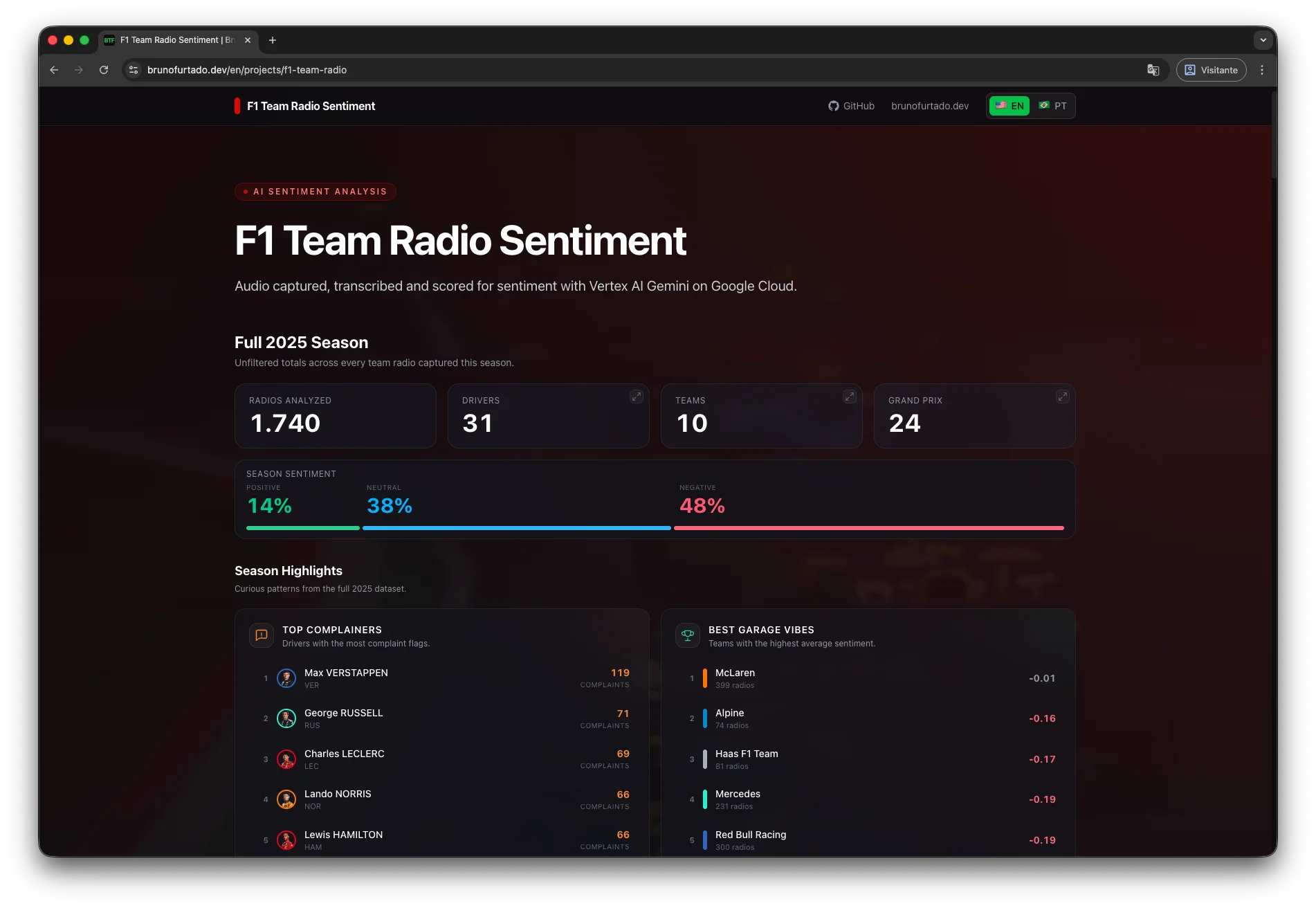
The data source here is Formula 1, but the pipeline is the same for any call audio. Swapping the collector for an SFTP, an API, or a bucket is a small effort.
Architecture
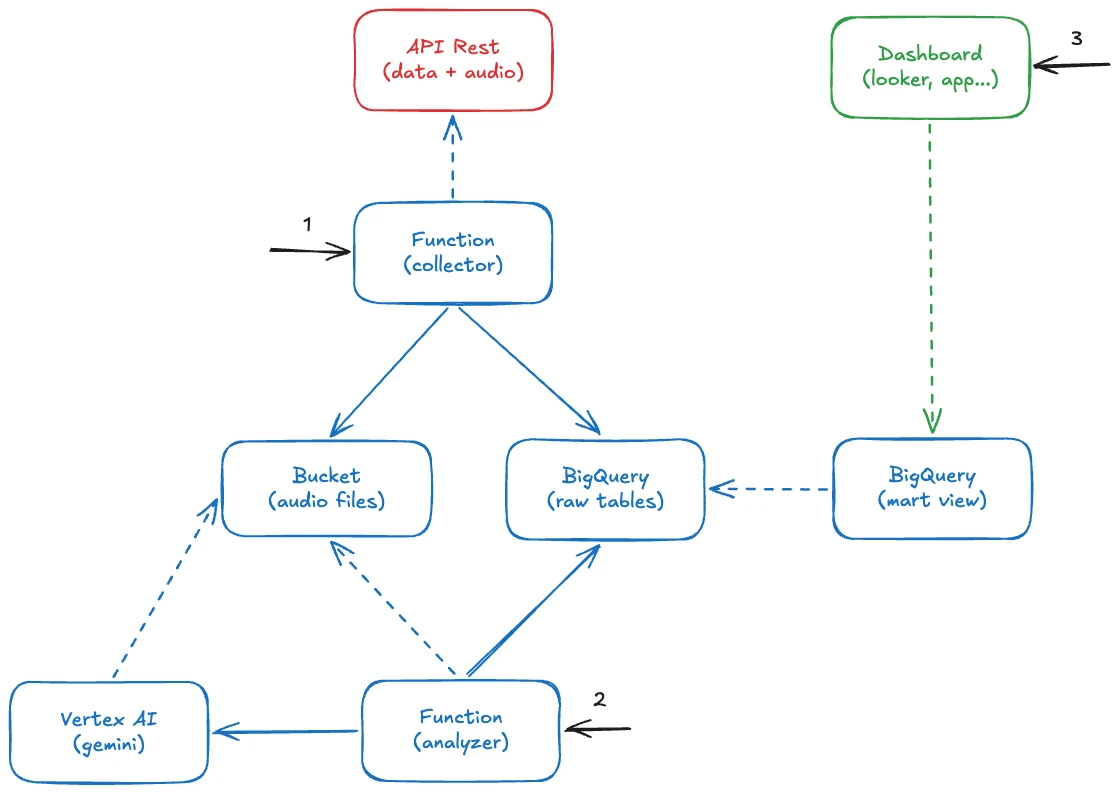
The pipeline consists of two Cloud Functions (Gen2) written in Python, plus BigQuery as the storage and query layer.
Data Collection
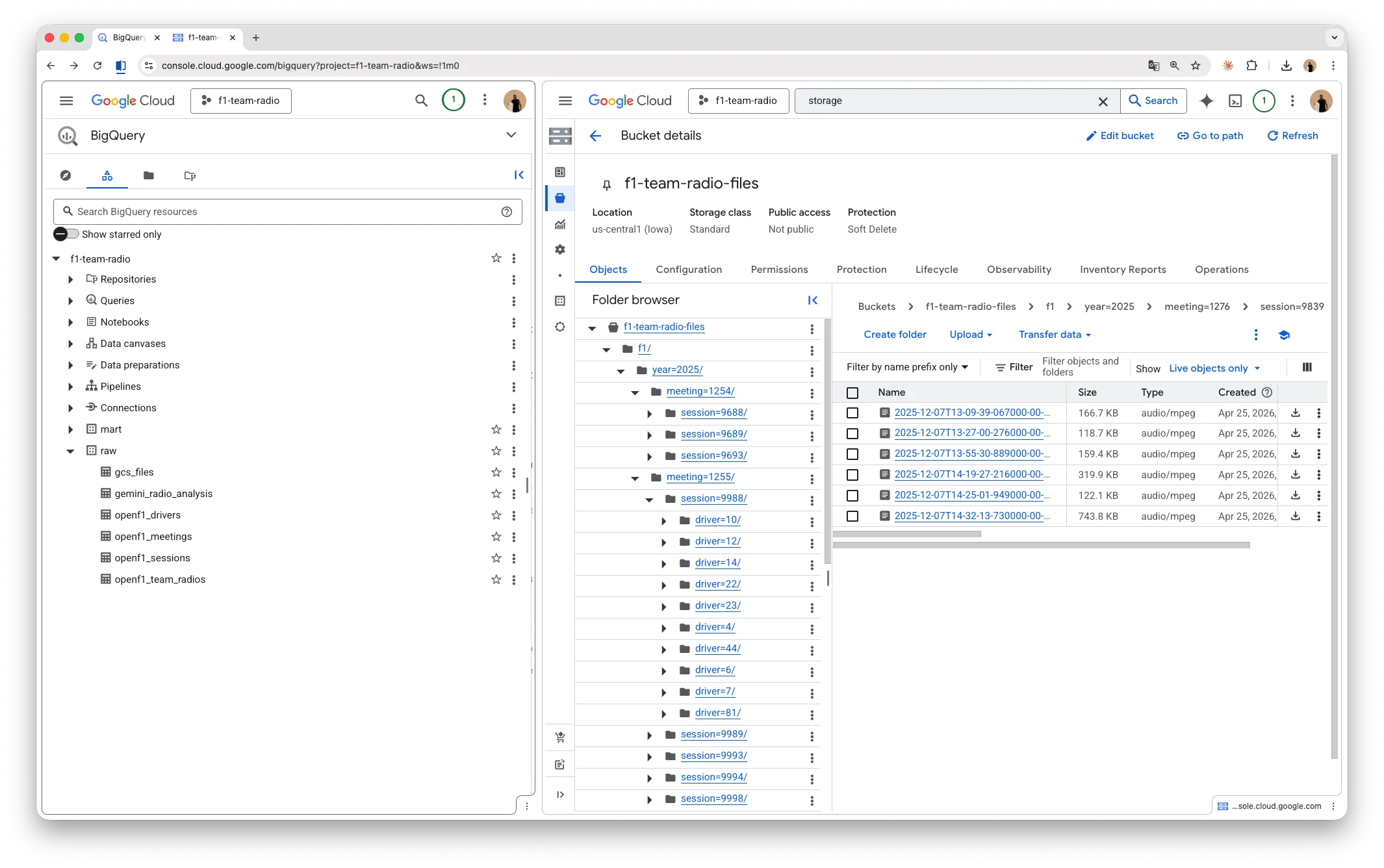
The first function reads metadata from the OpenF1 API, downloads MP3s in parallel (respecting the rate limit), and saves the files to a path (year=.../meeting=.../session=.../driver=.../*.mp3) on Google Cloud Storage (GCS). Each audio becomes a record in the raw.openf1_team_radios table on BigQuery.
Audio Analysis
The second function picks up pending audios, sends them to Gemini for transcription and sentiment analysis, and finally persists the structured JSON as a record in the raw.gemini_radio_analysis table.
Processing Strategy
A pure SQL watermark tells which audios have not been processed yet. Each run picks up whatever is left behind (a useful pattern for any pipeline where data arrives incrementally).
SELECT t.gcs_uri, t.driver_number, t.meeting_key, t.session_key
FROM `your-project-id.raw.openf1_team_radios` t
LEFT JOIN `your-project-id.raw.gemini_radio_analysis` a USING (gcs_uri)
WHERE a.gcs_uri IS NULL
Choosing the LLM
For the LLM, I picked gemini-2.5-flash. For short audio it delivers transcription and classification at a very low cost. The gemini-3.1-pro-preview only kicks in as a fallback, and that decision is also a cost strategy. Flash has a smaller context window (when the audio is large enough to exceed that limit, the call fails).
def analyze_one(row):
    try:
        return call_gemini_with_retry(row, 'gemini-2.5-flash', 'us-central1')
    except Exception:
        # audio too large, non-recoverable failure on flash; goes to pro
return call_gemini(row, 'gemini-3.1-pro-preview', 'global')Building the Prompt
The system prompt defines the model's role and the fields it must produce:
You are an analyst of Formula 1 team radio communications.

You will receive a short audio clip plus a JSON metadata block describing
the context (driver, team, session type, Grand Prix, country).

Produce a structured JSON output with:
- transcription: list of timestamped segments
- sentiment_score: number between -1.0 and 1.0
- sentiment_label: positive | neutral | negative
- emotion: calm | focused | frustrated | angry | excited | disappointed
- is_complaint: boolean
- complaint_target: car | tyres | strategy | weather | other_driver | team | none
- topic: pace | tyres | strategy | weather | incident | position | fuel | brakes | engine | communication | other
- summary: 1-2 sentence summary in English
- language_detected: ISO 639-1 code
Structured Response
When asking for JSON in the prompt, the cleanest path is to declare the structure via response_schema, with enums at the center:
RESPONSE_SCHEMA = {
    'type': 'object',
    'properties': {
        'sentiment_score': {'type': 'number'},
        'sentiment_label': {
            'type': 'string',
            'enum': ['positive', 'neutral', 'negative'],
        },
        'emotion': {
            'type': 'string',
            'enum': ['calm', 'focused', 'frustrated', 'angry', 'excited', 'disappointed'],
        },
        'is_complaint': {'type': 'boolean'},
        'complaint_target': {
            'type': 'string',
            'enum': ['car', 'tyres', 'strategy', 'weather', 'other_driver', 'team', 'none'],
        },
        'topic': {
            'type': 'string',
            'enum': [
                'pace', 'tyres', 'strategy', 'weather', 'incident',
                'position', 'fuel', 'brakes', 'engine', 'communication', 'other',
            ],
        },
        # transcription, summary, language_detected, is_positive_outcome...
    },
    'required': [...],
}
The enums do the heavy lifting. Since Gemini can only respond with an allowed value, you never need regex, normalization, or post-processing.
The call itself is short, with try/except wrapping generate_content so the fallback from the previous snippet works:
contents = [
    genai_types.Content(
        role='user',
        parts=[
            genai_types.Part.from_uri(file_uri=row['gcs_uri'], mime_type='audio/mpeg'),
            genai_types.Part.from_text(text=f'Context metadata:\n{metadata_json}'),
        ],
    )
]

config = genai_types.GenerateContentConfig(
    system_instruction=PROMPT,
    response_mime_type='application/json',
    response_schema=RESPONSE_SCHEMA,
    audio_timestamp=True,
)

try:
    response = client.models.generate_content(
        model='gemini-2.5-flash',
        contents=contents,
        config=config,
    )
except Exception:
    # propagates so analyze_one can decide between retry and pro fallback
    raise
Note that the audio comes in as Part.from_uri pointing straight to GCS. There is no need to download the file inside the function and then upload it to Vertex.
Result
The output for each audio matches the schema:
{
    "transcription": [
        { "start_time": "00:01", "start_time_seconds": 1.0, "speaker": "engineer", "text": "Box, box, box. Soft tyres." },
        { "start_time": "00:04", "start_time_seconds": 4.2, "speaker": "driver", "text": "Copy. Coming in." }
    ],
    "sentiment_score": 0.1,
    "sentiment_label": "neutral",
    "emotion": "focused",
    "is_complaint": false,
    "complaint_target": "none",
    "is_positive_outcome": false,
    "topic": "strategy",
    "summary": "Engineer instructs the driver to pit for soft tyres; driver acknowledges.",
    "language_detected": "en"
}
This object lands directly in BigQuery, in a table where transcription is modeled as RECORD REPEATED. From there, any BI tool consumes it without extra ETL: Looker Studio, Metabase, Power BI, or even a spreadsheet wired up via BigQuery.
To feed the dashboard, I created a view in the mart layer that consolidates the fields the front end uses (aggregates by GP, session, team, and driver). The view keeps the business logic in BigQuery and keeps the front end lean, with no transformation on top of the JSON.
On top of it, a Python script runs at the end of the pipeline and exports a snapshot as static JSON, served by the front end at /projects/f1-team-radio. That works here because the data is 100% public and can ship in the site bundle. In a production setup with sensitive audio, the right design would be a backend reading the view on demand, with authentication, authorization, and access control.
Cost ($)
About 1,800 audios, roughly 260 MB in total, averaging 150 KB per file. Duration almost never goes beyond 10 seconds.
| Service | Cost |
|---|---|
| Vertex AI (Gemini) | R$42.28 |
| Cloud Run Functions | R$0.00 |
| BigQuery | R$0.00 |
| Cloud Storage | R$0.00 |
| Artifact Registry | R$0.00 |
| Cloud Build | R$0.00 |
| Total | R$42.28 |
In short, R$0.023 per call, without compromising output quality.
Real Use Cases
By swapping the audio source and tweaking the schema enums, this covers several practical scenarios:
- Customer support: prioritize tickets from frustrated customers based on the detected frustration level. Group complaints by target to understand what is breaking in the product.
- Sales: surface recurring objections in SDR calls. Compare the average tone by funnel stage to find where conversion goes sour.
- Vendors: automatic logging of tone in long negotiations, useful when revisiting agreements before renewal.
- Customer success: track sentiment over recurring check-ins with key accounts, without depending on post-call NPS.
About the Project
The full source code is available on GitHub and the result is live on the dashboard.
If you want to give it a try, feel free to clone it and adapt it to your own audio source.
Thanks for reading.